




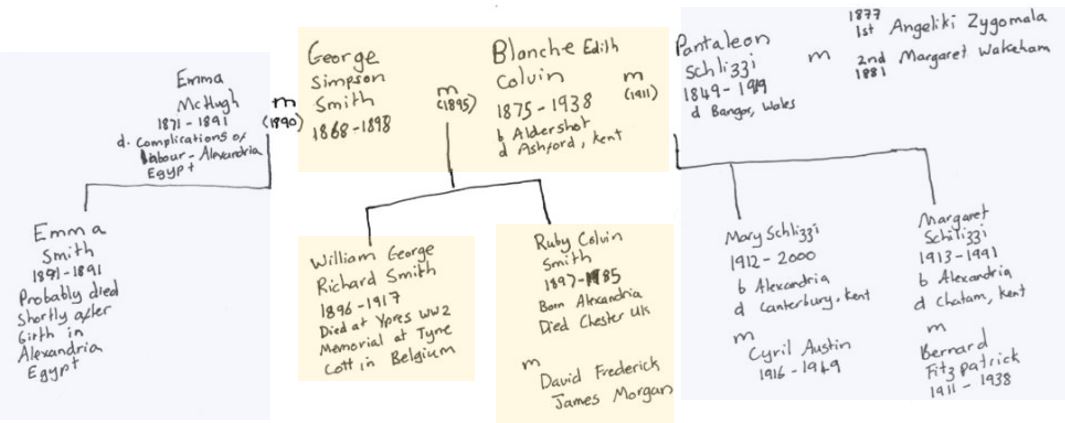
I have always enjoyed hand written tree’s and I was keen to see whether I could create one on my wordpress site which was clickable. There is some fairly old fashioned now technology within html called “image map” however it took me a long while to work out how I could do it wordpress without resorting to an expensive plugin (you need a business account which works out at over £200 per year to add plugins).
I found a great little site that basically writes the html for you:
https://www.image-map.net/
However when I used the block editor in wordpress it messed it up.
I tested in out in codepen and my code worked fine. It was just finding a way of putting it into wordpress.com
It turns out that it is possible with caveats. You have to use the classic editor and go to the code pain. This is becoming increasingly hidden in the new block editor world of today’s wordpress. However you can do it. For a post you can find it on the main list. And for a page you to edit the page and go to the overflow menu right at the top right hand corner and click on “code editor”.
The only downside of this is that is that by default it makes the image unresponsive – so it does not change size. This is something of a blessing because it means that your hotspots remain accurate. However the hotspots still did not quite seem to work in my theme in the mobile view.
I have decided to overcome this by adding buttons to any links on the image map. That way even if the map does not work the buttons do.
The example below has one clickable area over the McHugh’s (I have not done the other areas yet).
I like the feel of being able to click on the map for more information. Felt like I had made some progress today!
 View Posts Index
  Common Ancestor Tales